
This page is an original motion-design archive on aogl.cn. Every asset lives under original/ai-animation/ (captured 2026-07-08). The subject is a full-screen clinical scene animation: copy on the left sells a “scene display” story, the right side carries a semi-transparent 3D torso for vital-signs visualization, and a circular reticle over the abdomen marks the active “temperature measurement” beat. This is not a regulated medical device label—only an honest production note on how I assemble AI-assisted medical visualization motion into something crawlable and reproducible.
What is in the folder
ScreenShot_2026-07-08_162242_942.png— full-UI still used as the hero frame and WebP cover source.Google Chrome 2026-07-08 16-19-20.mp4— Chrome window capture of scene transitions (~27 MB, H.264).
Two files are the minimum deliverable: a still that explains information architecture and a clip that explains timing. For SEO, pairing long-form copy, descriptive alt text, a video poster, and stable file paths beats uploading a naked MP4 with no context.
Scene narrative: “guided by clinical needs”
The still labels the block 场景展示 (scene display) and headlines: Guided by clinical needs—whatever clinicians need, we find a way to build it. That line reframes the piece away from generic sci‑fi chrome and toward medtech storytelling. Buyers and clinical engineers get philosophy before feature depth.
I treat each left-rail item as a switchable capability module, not a one-off shot. In the recording below, list emphasis and the torso read stay linked—left rail = catalog, right body = spatial anchor. Even muted, the layout communicates where action happens anatomically.
Left-rail vital modules (information architecture)
The lower-left stack lists four capabilities; temperature measurement is highlighted as the active scene:
- Core body temperature monitoring — blood temperature — core vs skin-surface reads.
- Blood pressure monitoring — hemodynamics lane.
- Blood sampling — invasive workflow contrasted with passive monitoring.
- Temperature measurement (current) — drives reticle placement in this frame.
Muted gray labels plus a bright active row mirror common dark medical UI patterns. Repeating the full phrases in prose helps long-tail queries like “core temperature monitoring animation demo” or “clinical scene blood pressure UI motion”.
Right visual: holographic torso and targeting reticle
The hero is a semi-transparent 3D chest/abdomen with cool blue rim light on a navy gradient. It is not a literal dissection plate—it uses the holographic glass idiom common in hospital expo loops: suggest anatomy without publishing unapproved clinical imagery.
A white circular reticle (corner tick marks) sits on the upper abdomen, semantically an aim point or algorithm ROI. It aligns with the active temperature row. For localization you can move the reticle to a cuff site or venous access while reusing the same rig—cheaper than rebuilding geometry per scene.
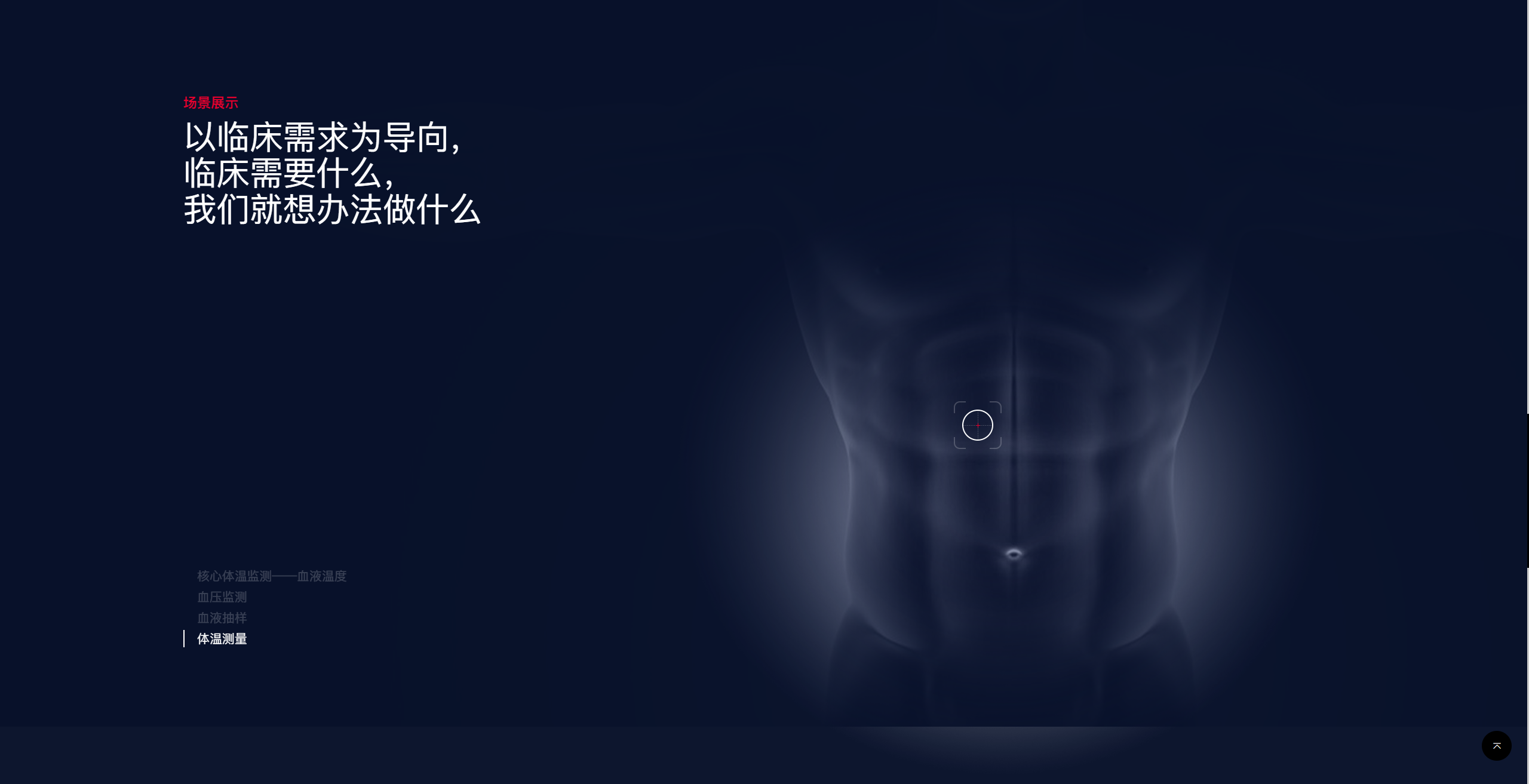
ScreenShot_2026-07-08_162242_942.png — full-screen clinical scene UI still (hero source).Color and typography: dark medtech
Background sits near navy #0a1628; type is white and cool gray; accents are cyan volumetric light. The small red “scene display” tag adds a clinical alert + tech blue dual cue. A circular back-to-top control bottom-right implies a long-page or full-screen web player, not a classic 16:9 social crop.
Dark UI helps the glowing body and reticle pop, but MP4 exports need enough bitrate (≥8 Mbps recommended) or gradients band badly. I keep the raw capture uncompressed here for regrading and future poster frames.
Browser capture: timeline and pacing
The embed is the Chrome recording. Default OS filename Google Chrome 2026-07-08 16-19-20.mp4 documents list transitions, highlights, and lighting drift. Download from original/ai-animation/ if inline playback fails.
Google Chrome 2026-07-08 16-19-20.mp4 — full-screen scene animation capture (poster = still above).Review checklist: (1) list changes stay frame-synced with reticle moves; (2) torso idle motion never fights numeric UI; (3) hierarchy survives 1080p thumbnails for LinkedIn or booth loops. No voiceover yet—room for EN/ZH narration tracks later.
AI animation workflow (personal practice)
This clip is AI animation look-dev in my vocabulary: generative passes lock lighting/material/mood, then timeline work happens in-browser or in AE/Blender for UI comp. Tool brands change; what matters is keeping verifiable screenshots and captures beside the final render.
- Copy anchor — write capability list + value line before pixels, so IA does not drift.
- Body asset — translucent torso from DCC or AI stills + comp; mild perspective for UI overlay.
- Prototype — validate left-rail ↔ right-focus linkage in web fullscreen or Figma, then record.
- Archive — PNG still + MP4 + 800+ words here →
data/articles/→ home carousel.
Sits alongside character turnaround walk and sports-lens composite in the “personal demo + honest notes” series, but targets medtech / clinical visualization keyword clusters.
Accessibility and SEO
- Image
altnames clinical scene, module list, 3D torso, reticle—not “image 1”. - Video
posterplus prose storyboard offsets missing subtitles for crawlers. - Repeat canonical capability strings in body copy for bilingual queries.
- First-screen HTML carries the full article—no JS-injected body (static build habit).
Compliance boundary
Documented UI is personal visual research, not medical advice, regulatory labeling, or clinical evidence. Commercial reuse needs separate SaMD compliance, privacy review, and authorized data. This site only archives my folder—no endorsement of third-party devices.
Search and related originals
Assets: original/ai-animation/ · published 2026-07-08 · editorial entry #45 on the home carousel (newest first).