
This is a first-party build log on aogl.cn. All screenshots live under original/wordpet-app/ (archived 2026-07-15). WordPet is an app I developed myself (footer credit © 2026 kolang). App link: https://wordpet.aogl.cn/—a mobile web app that binds textbook-synced English vocabulary to a virtual pet growth loop. The landing line is blunt and memorable: recite words daily, feed your stone monkey. This page is not third-party marketing copy. It walks through my own UI captures—register and adopt, textbook lists, know/don’t-know flashcards, voice pet dialogue, Spirit-Fire egg battle status, and a rarity pet library—so search engines and humans can index phrases like “textbook vocabulary pet app,” “Shanghai Education Edition word list,” and “gamified daily English check-in.”
og-share.png — brand / Open Graph source: stone monkey + A–Z book.What’s in the folder
og-share.png— brand key art: marble-textured stone monkey, purple-gold A–Z hardcover, sparkles; used as this article’s hero.login.png— landing flow: register → adopt → daily check-in → XP → evolve.textbook.png— Vocabulary Book Learning with PEP / FLTRP / Shanghai editions and a pinned main book.learn vocabulary.png— Today’s Words flashcard (example: pilot) with Know / Don’t know.pet.png/Pet Dialogue.png— Nezha Spirit-Fire egg in battle and hold-to-talk dialogue.Pet Collection.png— Pet library grid: White Snake, Kirin, Stone Ape, Word Cat, and more.
Captures were taken in a mobile browser at the app URL https://wordpet.aogl.cn/ with footer © 2026 kolang. For SEO, pairing structured prose with descriptive image alt text beats a bare download link: crawlers see entities (editions, UI labels, pet names) in HTML first paint—not only in pixels.
Positioning: a habit loop, not another word dump
The world already has “know / don’t know” cards. WordPet’s bet is that learning outcomes should feed a visible care loop: study words → gain experience → evolve or field a pet. The login screen compresses that into five steps:
- Register / log in — a durable account, not a disposable guest session.
- Adopt a pet — emotional anchor (stone ape, Nezha, and friends) before a long book list.
- Daily check-in — cadence over cramming three hundred lemmas once.
- Gain experience — “I know this” becomes XP that maps to level and battle power.
- Evolve and grow — egg stages, gold ranks, and stars make progress feel tangible.
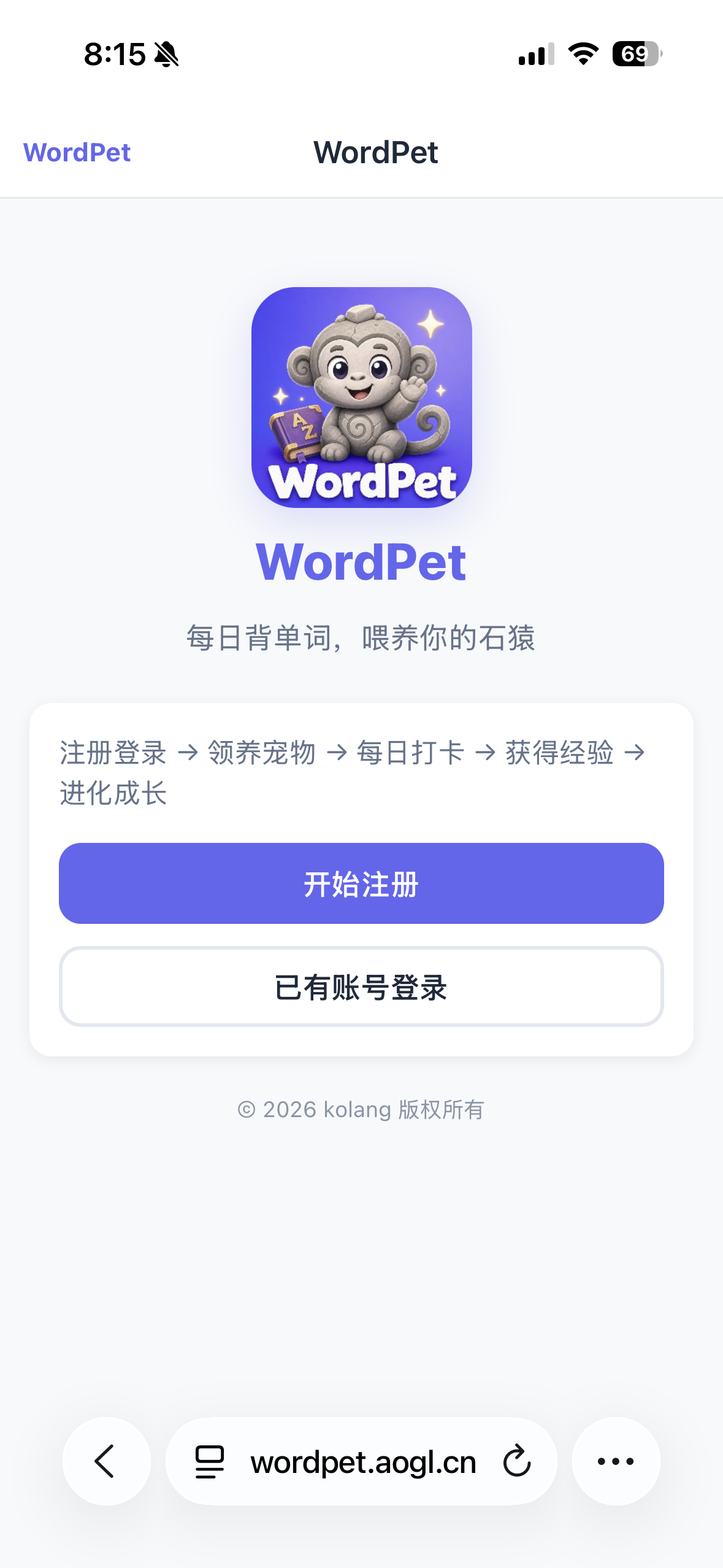
login.png — registration landing and five-step growth path.Psychologically this is an extrinsic lure (cute pets) serving an intrinsic goal (curriculum words). Parents care about textbook alignment; kids care about battle status and dialogue. If you only ship one side, you get either a drab word sheet or a gacha skin with no learning spine. WordPet keeps both on one bottom bar: Home / Study / Pets / Me.
Vocabulary books: textbook sync beats a generic bank
The Vocabulary Book Learning screen pins a main book example: Shanghai Education Edition · Grade 5 Volume 1. Tabs cover Textbook Sync (default), General Grades, and Other. Horizontal chips list Renjiao PEP (Autumn 2026), FLTRP NEW, and Shanghai NEW; a primary/middle toggle switches school level. Cards show unit counts, progress bars (for example 13% and 4%), and a button to set as main book for daily check-in.
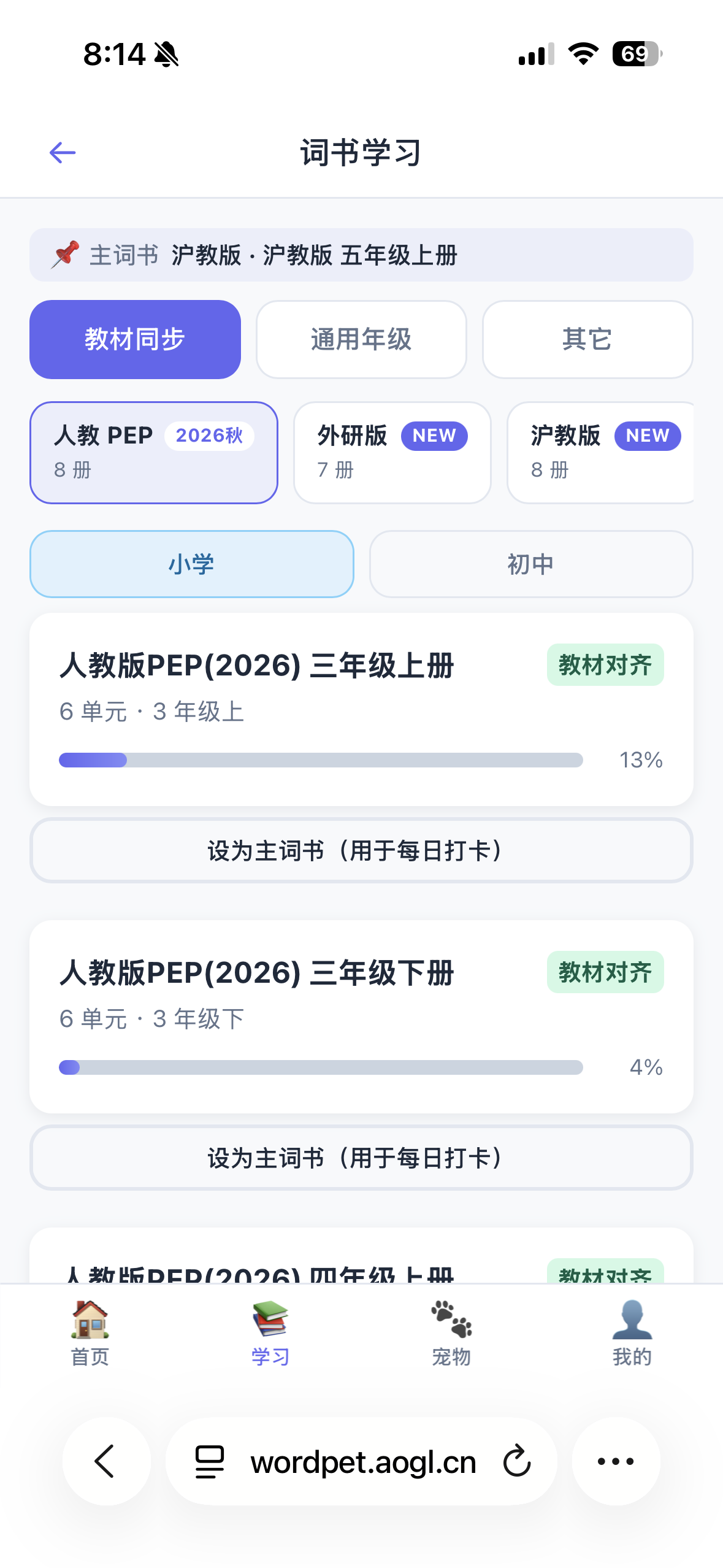
textbook.png — textbook-aligned lists and main-book switch.For primary English in China, if progress is not axed on textbook units, “daily check-in” drifts away from classroom tests. This article deliberately repeats entities such as Renjiao PEP, Shanghai Edition, FLTRP, Grade 5 Volume 1, Grade 3 Volume 1 so parents can find the page with edition queries. After a book is pinned as main, the Today’s Words source strip should show the same origin—so the check-in queue and the main book stay consistent.
Today’s Words: lowest-friction flashcards
On the sample Today’s Words screen, progress reads 1 / 10. The source chip points at Shanghai Grade 5 Volume 1. The center card shows pilot, IPA /ˈpaɪlət/, definition “n. pilot (飞行员)”, example The pilot flies the plane., plus a speaker control. Two large footers read Don’t know ✕ and Know ✓—classic spaced-repetition entries sized for thumbs.
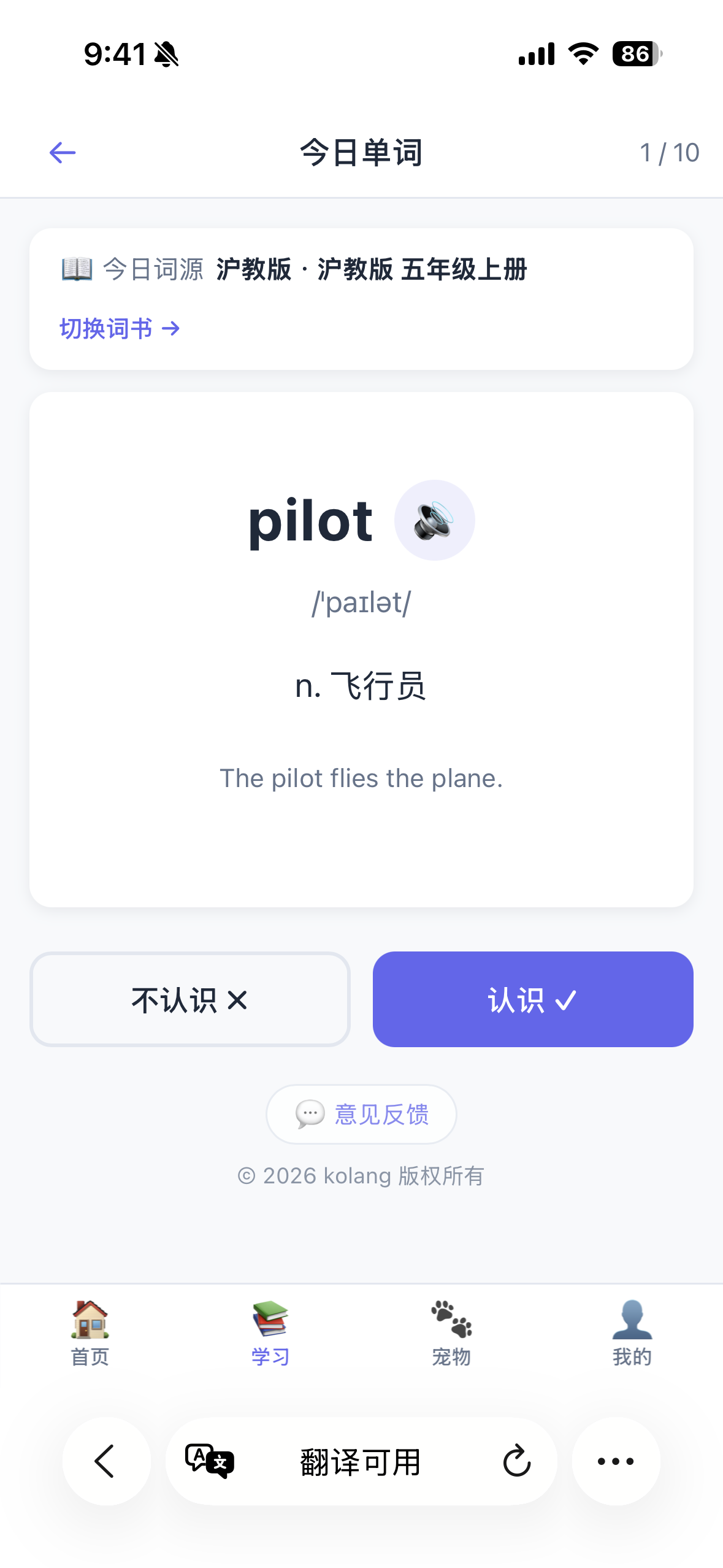
learn vocabulary.png — daily flashcard and textbook source strip.My design bias is a small daily load with clear feedback (about ten items) rather than a hundred-word guilt pile. XP should track genuine “know” outcomes and corrections—not mere page turns—or pet XP becomes decorative noise. A Feedback control at the bottom of the flashcard page lets students report bad IPA or example sentences without leaving the study flow.
Compared with generic CEFR lists, textbook-synced sets trade breadth for relevance: fewer words, higher classroom payoff. That trade is honest product strategy, not a missing feature. If WordPet later adds exam banks, they should stay on a separate tab so “main book for check-in” remains unambiguous.
My Pets: Nezha’s Spirit-Fire egg on the field
The My Pets carousel shows Nezha, Stone Ape, Ink-Rhyme Dragon, and more. In the sample, Nezha is the fielded SSR: Spirit-Fire Egg stage, Lv.4, Gold-1, battle power 95, EXP 660/1000, flavor line about cracks of spirit fire. Cracked lava shell and flame wisps sell “still growing” better than a finished standing art—critical for evolution anticipation.
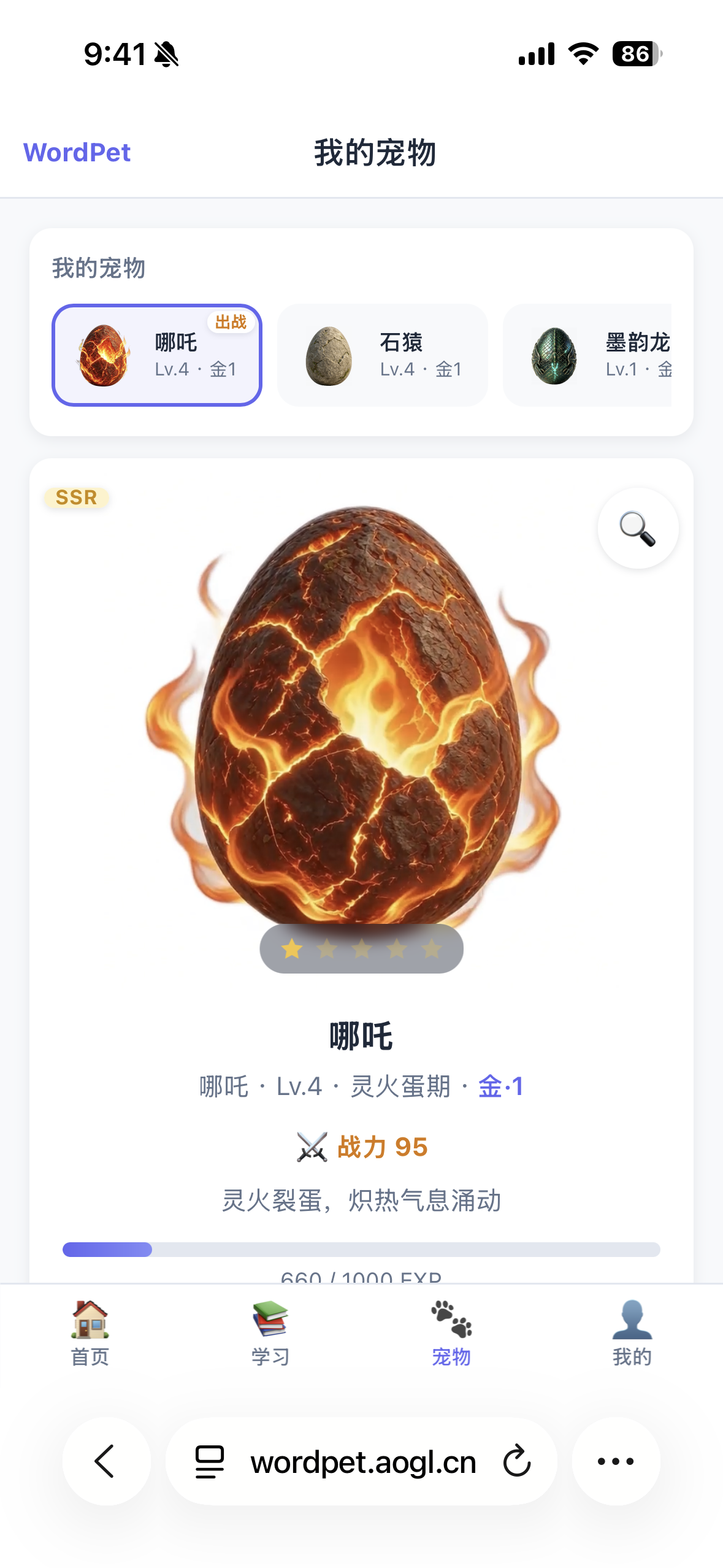
pet.png — Nezha battle detail and pet carousel.Naming mixes myth flavor (Nezha, stone ape, ink dragon) with study semantics (Word Cat and Knowledge Dog in the library). Battle power is a kid-readable scoreboard; real mastery still lives in vocabulary progress bars. Product copy should never imply that pulling rarities replaces finishing units.
Pet Dialogue: a soft door into speaking practice
Pet Dialogue places the fielded pet center stage. Above Nezha’s egg, a bubble mixes English and Chinese (for example celebrating “Apple” and joking about Ao Bing and tomorrow’s words). The primary control is a microphone: hold to talk, release to send, with keyboard and speaker helpers. Voice input sits inside the care scene instead of a sterile oral-exam page.
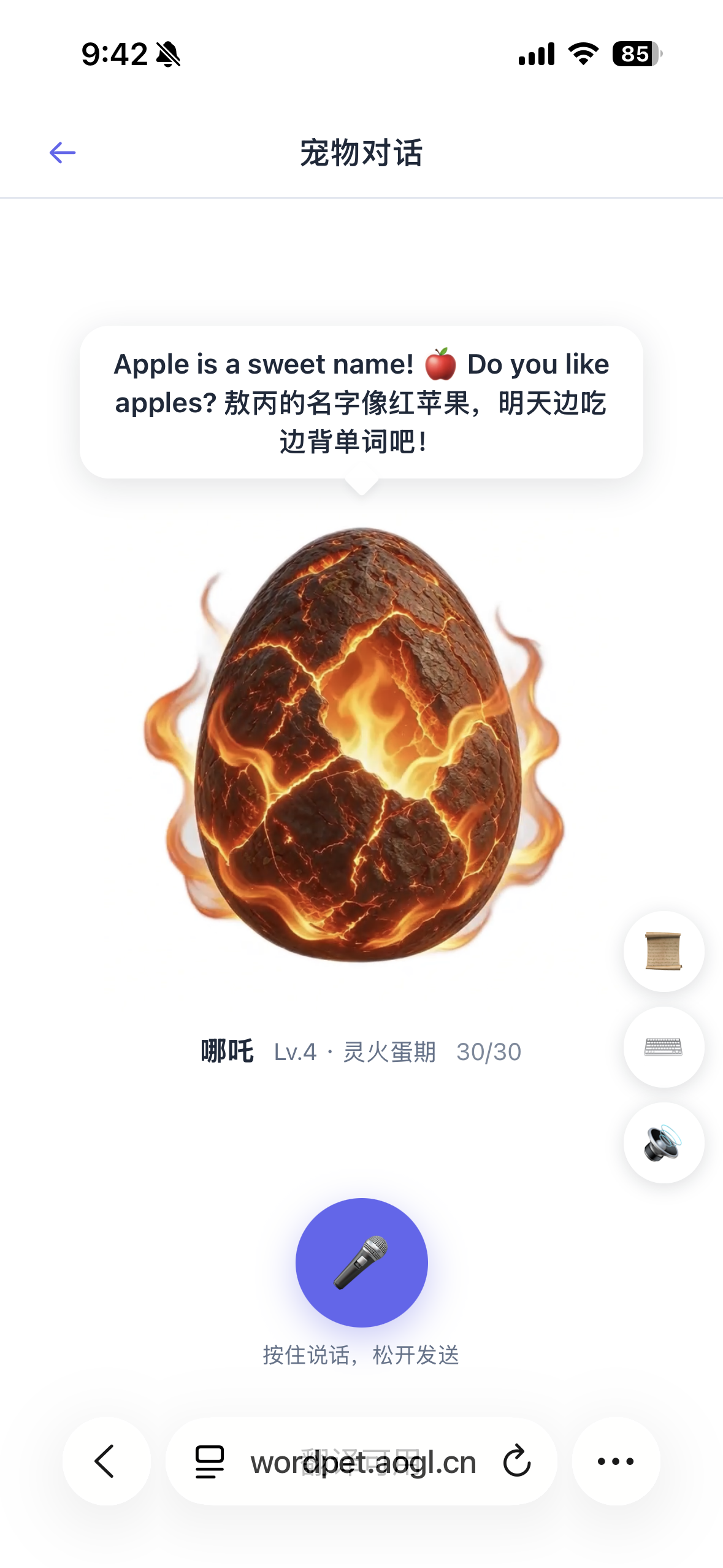
Pet Dialogue.png — pet dialogue and hold-to-talk voice entry.Implementation must face weak networks, denied mic permissions, child privacy, and content moderation. Bubbles should stay short, encouraging, and bilingual-friendly; long composition prompts do not belong here. For search, this section stresses “pet dialogue” and “hold to talk” so speaking-practice queries can land on a real UI description—not a keyword-stuffed outline.
Pet library: rarity grids and field / summon actions
The library grid lists White Snake, Kirin, Bai Ze, Jade Rabbit, Fei Fei, Stone Ape, Word Cat, Knowledge Dog, Tiger, and more, with rarity chips SSR / SR / S / A. Unowned pets show Go to summon; owned pets show Set to battle. Stone Ape appears as an owned SSR—the brand mascot coming full circle.
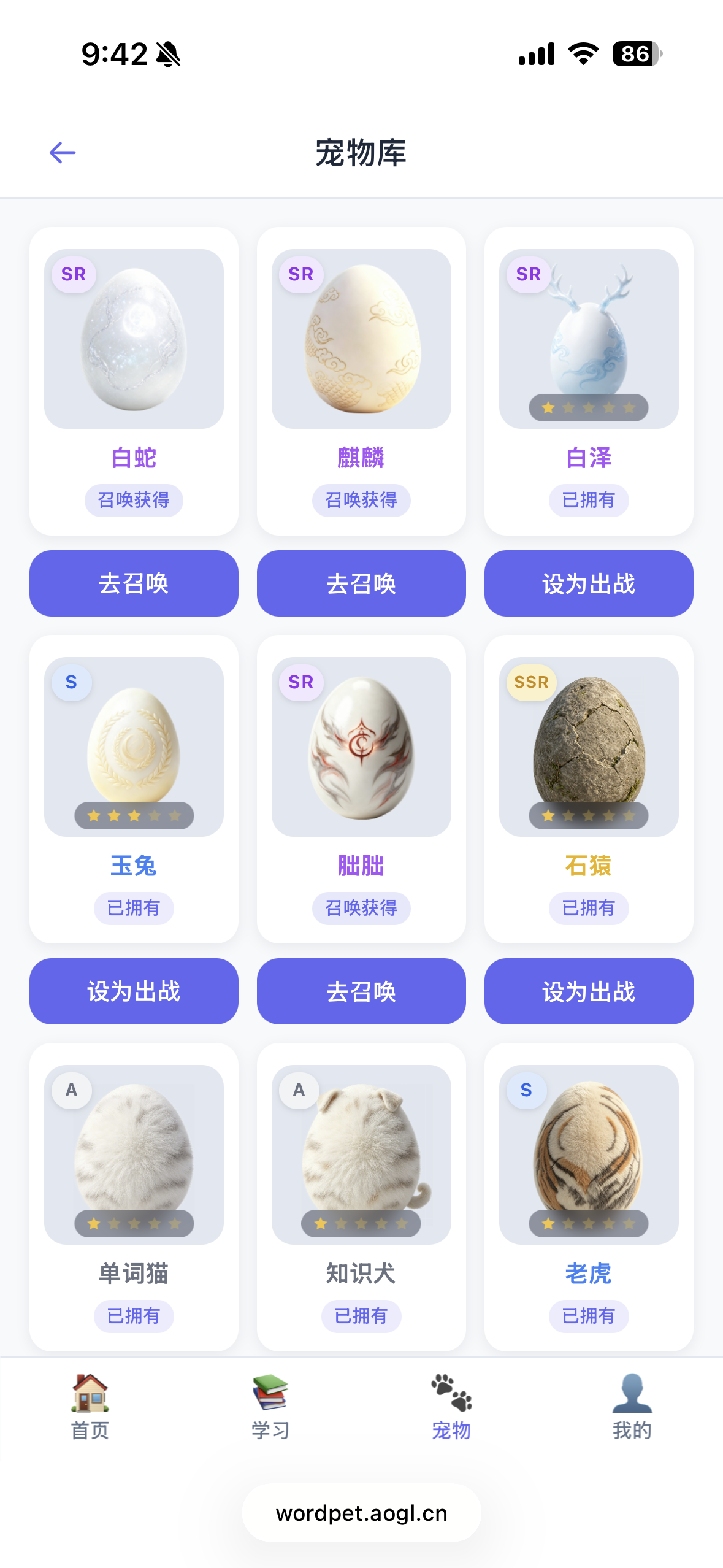
Pet Collection.png — rarity library and ownership states.Healthy collection design keeps summon costs from overshadowing daily study. The spine should remain main-book check-in → XP → evolution; summons are side-path cosmetics. Mentioning Word Cat and Knowledge Dog as searchable novelty entities also signals to crawlers that this is learning-forward pet raising, not a generic anime gacha portal.
IA summary: four-tab bottom navigation
- Home — today’s tasks and entry aggregation.
- Study — books + Today’s Words (the textbook battlefield).
- Pets — field status, dialogue, library (emotion and retention).
- Me — account and settings.
That layout fits primary-school thumbs and lets parents find “switch word book” quickly. Unlike this site’s WebGL earth or character turnaround demos, this note sits in the EdTech / primary English / habit formation cluster—useful as an AdSense-facing sample of real product documentation with original screenshots.
Workflow notes from shipping WordPet beside aogl.cn
Running WordPet as a sibling origin (wordpet.aogl.cn) next to the editorial static site forces clean boundaries: marketing pages and SEO essays live on aogl.cn with first-screen HTML; the interactive product stays on its own subdomain with its own auth cookies. When I archive screenshots into original/wordpet-app/, I keep filenames that match UI English titles even when they contain spaces, then percent-encode them in article markup. Hero generation still goes through npm run generate-article-covers so Open Graph gets a 1200×675 WebP without inventing stock photography.
If you maintain a similar product, write the article while the UI is still fresh: label every control you can see, quote edition names exactly, and avoid promising roadmap features that are not on screen. Reviewers and parents both trust screenshots more than slogans. Pairing Chinese and English bodies—Chinese for regional textbook SEO, English for international EdTech keywords—covers both surfaces without machine-translating every short locale in full.
Accessibility and SEO checklist
- Alt text names visible UI entities (book titles, pet names, button labels)—never “image 1.”
- Body text repeats WordPet, app URL
https://wordpet.aogl.cn/, Shanghai Edition, Renjiao PEP, Today’s Words, Pet Dialogue, Stone Ape, Nezha. - Outbound product links use
rel="noopener noreferrer"; full narrative ships in first-paint HTML. - Spaced filenames are percent-encoded in
src(for examplelearn%20vocabulary.png).
Boundaries
These screens document WordPet, an app I built (© 2026 kolang)—a personal demo and UI archive. Progress numbers and battle power change per account; edition names match what the UI showed at capture time. Nothing here claims official publisher partnerships. Children should use microphone and account features with a guardian present.
Related searches
Assets: original/wordpet-app/ · app I built: https://wordpet.aogl.cn/ · published 2026-07-15.