
This is a personal usage note on aogl.cn, archived under original/img2threejs/ (2026-08-03). The subject is the open-source project img2threejs (Apache-2.0; this page tracks notes against v1.4.3): rebuild one reference image into a code-only procedural Three.js model—not photogrammetry, not mesh ripping, not an art-pack download. The deliverable is a diffable TypeScript THREE.Group factory with pivots, sockets, and colliders so the result is animation-ready instead of an inert lump. Below: what it is, how it differs from generic image-to-3D, how to install and invoke it, how to tighten gates, and when to stop—plus a showcase still—so search can land on phrases like “image to Three.js,” “procedural Three.js from photo,” and “Claude Code 3D skill.”
logo.svg — project mark archived from upstream assets.What problem it attacks
Browser props and hard-surface props usually take one of two paths: drop a GLB into the scene, or ask a large model to emit a one-shot Three.js blob. The first is awkward to review in git; the second burns tokens and often yields unmaintainable geometry. img2threejs narrows the promise:
- Reconstruction-by-code — sculpt with primitives, procedural shaders, and generated geometry.
- Quality-gated — build pass by pass; every advance needs a render-versus-reference review.
- Token-efficient — Python scripts own validation, gating, and comparison packaging; model tokens go to visual judgment and code.
- Animation-ready — a runtime hierarchy, not a dead mesh dump.
The official live gallery is img2threejs-showcase: every demo is generated code running in the browser—orbit, inspect the reference, read the source. My archive file bmx-endurance.png captures the “BMX Endurance Bike” page: orange frame, five-spoke MAG wheels, sidewall lettering, a parts list (frame / welds / handlebar…), plus Explode parts and View generated source controls.
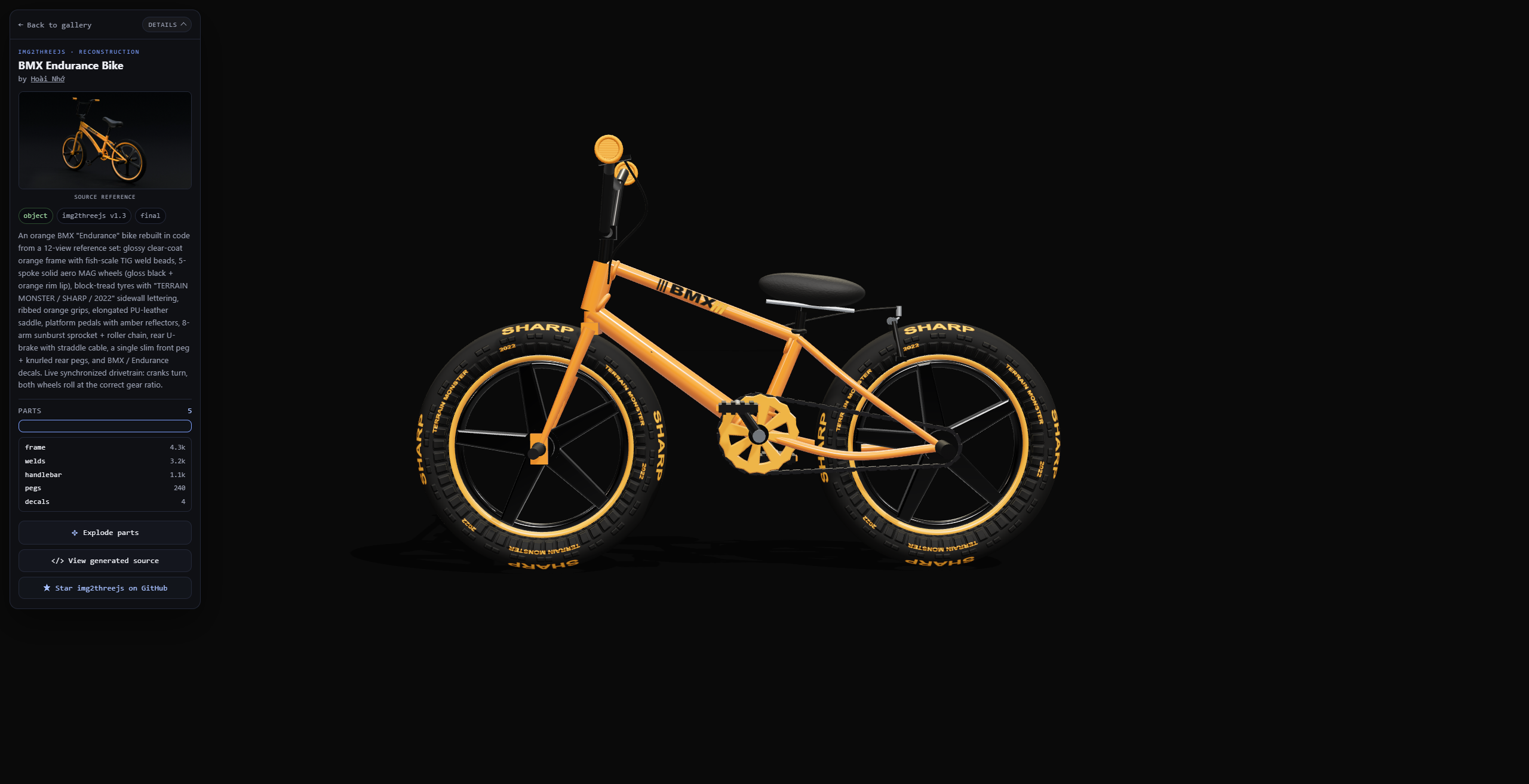
bmx-endurance.png — showcase screenshot: reconstruction viewport plus metadata rail.How it differs from “one-click 3D”
Many image-to-3D searches expect depth nets or Gaussian splats. img2threejs deliberately refuses that path. It authors an ObjectSculptSpec (components, materials, lights, pivots), then sculpts in a fixed order:
blockout → structural → form → material → surface → lighting → interaction → optimization
A pass unlocks only after a real render, a comparison sheet, an agent-vision score at threshold, and every identity-defining feature clearing its own bar. Scripts decide “may we generate?”; the model decides “does it look right?” That makes outputs reviewable and rollback-friendly (refine-spec / refine-code) instead of a black-box mesh.
Upstream architecture docs also stress token design: do not spend context re-validating JSON by hand or regenerating the entire factory each cycle. Emit only the unlocked pass; fail shallow specs with --strict-quality before the first Three.js line exists.
How to install (Claude Code and similar agents)
The skill is agent-agnostic. Docs often show Claude Code; Codex and OpenCode work too—wherever the text says “agent vision,” use the host’s image reader, a browser MCP, or a screenshot you provide.
- Clone into your skills directory (adjust the path for your tool):
git clone https://github.com/img2threejs/img2threejs.git ~/.claude/skills/img2threejs
- Confirm Python 3.10+. Forge scripts are documented as pure standard library—no pip install churn.
- Prepare a clear object reference (front or three-quarter, full subject, lighting that does not crush silhouette).
Local note original/img2threejs/rd.txt mirrors the same clone command and sample prompts for offline reading.
How to use: shortest invoke
In Claude Code, attach or point at an image, then run:
/img2threejs Rebuild this object as a Three.js model, keep the proportions, angles, and colours.
That one-liner is enough for a first pass: the skill classifies the subject (object / character / hybrid), builds a detail inventory, and advances gated passes. Your job is to watch each side-by-side sheet and refuse “globally high score but wrong identity feature”—SKILL.md is explicit that a pass fails if a defining detail is wrong even when the aggregate looks fine.
How to use: tighten the prompt (map words to gates)
The short form leaves judgment to the skill. When you already know what “correct” means, write it in—these lines map onto real gates and artifacts, not decorative adjectives:
/img2threejs Rebuild the subject in this image as a procedural Three.js model.
Fidelity   Hold proportions and silhouette to the reference. Enumerate identity-defining
           details first — bevels, seams, fasteners, engraved/painted linework, gloss vs matte,
           wear — and drop details you cannot place on a real component.
Materials  Derive finish class and gradient stops from reference pixels, not memory.
Runtime    Expose pivots/sockets for moving parts, plus userData.tick for idle loops.
Gates      Run --strict-quality; do not advance until side-by-side review passes.
           Report per-region confidence for hidden faces.
Subject-specific add-ons that actually change behavior:
- A specific person or character — maximize likeness: fit landmarks, de-light, camera-match, project; name inferred regions.
- An animal or creature — declare non-humanoid; use the matching body plan and body-unit proportions.
- Saturated anodized / candy coats — name candy-coat; do not let the environment steal hue.
- Cost ceiling — stay low effort; skip the presentation composer; keep only evaluation renders.
How to use: forge scripts without the agent loop
From the skill root you can drive stages by hand (useful for learning the pipeline or wiring CI):
python3 forge/stage1_intake/probe_image.py <image>
python3 forge/stage2_spec/new_pre_spec_assessment.py "Name" --image <image> --out assessment.json
python3 forge/stage2_spec/new_sculpt_spec.py "Name" --image <image> --assessment assessment.json --out spec.json
python3 forge/stage2_spec/validate_sculpt_spec.py spec.json --strict-quality
python3 forge/stage3_build/generate_threejs_factory.py spec.json --out src/createObjectModel.ts
Full script tables live in upstream docs/ARCHITECTURE.md. Day-to-day, start with python3 forge/next.py <spec>: it reports the unlocked pass, the exact next command, and unmet acceptance criteria—the “ask next first” habit SKILL.md insists on so you do not regenerate blindly.
Gates I watch while reviewing
- Suitability — is the image a viable 3D target at all.
- Pre-spec + strict-quality — block codegen when the spec is too shallow for the complexity tier.
- Detail inventory — gloss, bevels, fasteners, linework, stains must map to real components/materials, not prose-only claims.
- Screenshot feedback —
continueneeds a comparison sheet plus passing vision scores; identity failures trump a flattering global number. - Action-ready — runtime hierarchy via something like
userData.sculptRuntimemust exist for movable parts.
CS2 knife / Glock routes add family component contracts and projection-first finishes: patterned skins should prefer a de-lit reference projection over inventing a procedural Doppler. Otherwise the comparison sheet fails instantly. See upstream docs/cs2/review-gates.md and grimoire/build/cs2_finishes.md.
Transparency matters for debugging. After each pass, name what changed with evidence, and name what still mismatches. Opaque “done” claims force full restarts; precise “improved but still flat in Z” notes enable refinement—another reason this skill fits editorial SEO better than hype copy.
Honest limits (also an SEO honesty signal)
A single image cannot reveal hidden sides or guarantee exact geometry. The skill should label approximate / stylized / low-poly output and infer unseen faces by mirroring rather than faking confidence. It is stronger on hard-surface objects; characters are stylized reconstructions, not photoreal likeness. “This cannot reach the requested fidelity from this image” is a valid, expected result—and a reason I filed these notes on aogl.cn: the process is debuggable, not a marketing slogan.
What this site archives
original/img2threejs/bmx-endurance.png— BMX showcase UI still (hero source).original/img2threejs/logo.svg— project logo.original/img2threejs/rd.txt— repo URL, gallery URL, and quick-start excerpts.
Treat GitHub as the source of truth for code. This page exists so crawlers and humans get indexable bilingual how-to prose plus local screenshot evidence, sitting beside WebGL originals such as the interactive Earth demo when people search for procedural Three.js or agent-driven model rebuilds.
If you only need inspiration before installing the skill, open the live gallery first: orbit a few demos, click View generated source, then decide whether reconstruction-by-code matches your pipeline. If you install, keep the first subject simple (a hard-surface prop with readable silhouette) before jumping to patterned CS2 skins or likeness-max characters—those routes unlock more gates and more review vocabulary.
Related searches
Archive: original/img2threejs/ · upstream: github.com/img2threejs/img2threejs · published 2026-08-03. Personal site usage notes—not a replacement for upstream docs.